Your Games and Skat Statistics
Every solo round you play against Lothar is kept. Your Skat rounds form one run and your Ramsch rounds another, and neither run ever ends: round 200 sits in the same list as round 199, however many months apart you played them. Tables with friends keep their own running score and stay off this page.
Want to see what is in there already? Open your games.
Nothing Is Lost
The game is saved after every card, not only when a round ends. Close the tab in the middle of a hand, come back tomorrow, and the same hand is waiting for you, with the same cards in it and the same trick half played. Nothing is ever cleared away or reset either: a run is never closed, it simply keeps growing, one round at a time.
Pick a name in the start screen's name slot and register it with a password. The name attaches to the player you already are, so every round you have played so far comes along with it. From then on you sign in with that name wherever you play, on the phone in the kitchen or the laptop at work, and your rounds, your numbers and the hand you left half finished are all there.
Every Round, Unfolded
The list gives each run a section of its own and each round a row, the newest at the top. A row says who played what and how it went: the game type it was declared as, whether you were the declarer or a defender that round, and the name of whoever declared it. Beside that stand the round's three numbers: the bid the game was won at, the worth it came to, and your own net for the round. At the end sits the win or loss mark. A Ramsch round was never bid for, so its row leaves the bid out and shows the loser's card points where the worth would stand.
Tap a row and the round opens in full. At the top are its facts: the game type, with Hand or Ouvert if it was one, who declared it, the bid, the worth, the score the round paid, and the card points, declarer against defenders. Under that comes the auction, one line per seat with the number that seat bid or the word passed, and the winner's line carrying the bid the game was won at. Then every trick in order, all three hands as they stood when the trick began, the card each player laid lifted out of its fan, and both the card that led and the card that took the trick marked. You do not have to wait for a round to grow old to read it this way: the result screen's Tricks tile opens the same view for the round you have just finished.
Your Numbers
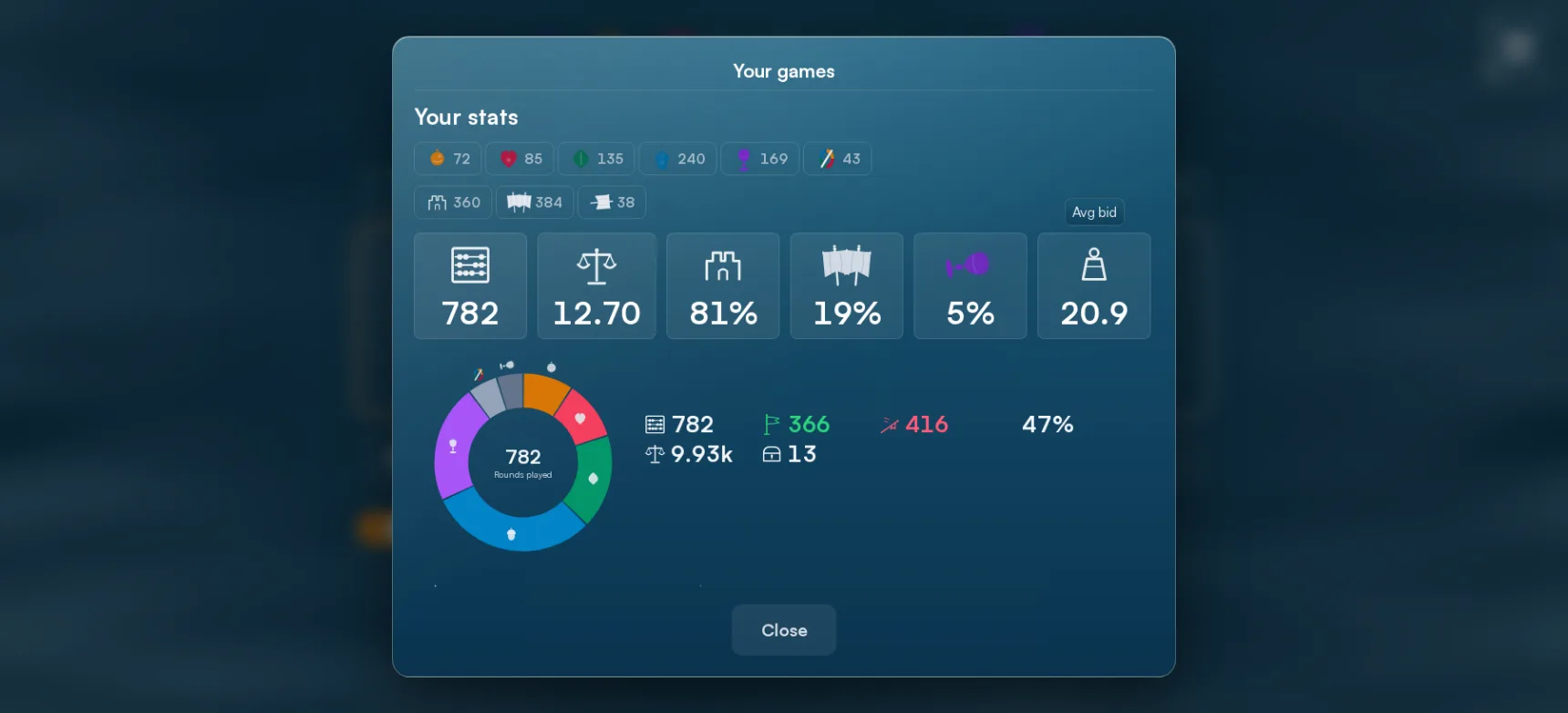
Above the list sits a panel called Your stats. At its heart are six cards counted over every round you have played: Rounds, Avg net, Declarer win-rate, Defender win-rate, Ramsch rate and Avg bid. Avg bid is the one a Skat player will want to compare. It says how high you dare to go in the bidding, and two players with the same win-rate but ten points between their average bids are playing very different games.
At the top of the panel, above the cards, runs a rail of chips, each one an icon with a count beside it, and the whole panel follows whatever you pick. There is a chip per game type, the four suits plus Grand and Null; one per role, the gatehouse for the rounds you played as declarer, the battle standards for the rounds you played as defender, and a third for Ramsch, which has neither role; and, once you have played both Skat and Ramsch, one per mode. Pick Grand and every number on the panel is suddenly about your Grand rounds alone, the standings row at the foot of it included, where your own score stands beside Lothar's and Stef's.
Below the cards lie three views of the same rounds. The ring shows how they divide across the game types and the two roles, so you can see at a glance whether you mostly declare or mostly defend. Hover a slice, or tap it on a phone, and that category's own numbers appear: how many rounds, how many won and lost, the rate, and the net they add up to. The bars underneath run left and right from a middle line, one per category, and they say where your net is earned and where it drains away.
Where to Find It
Mid-game, the pause menu's Your games entry opens all of it over your hand without disturbing the round. The start screen's reference strip carries the same entry. The result screen's Stats tile opens it already narrowed to the mode you have just played. And it has a page of its own, at /games, for reading through at length.
The lantern: the light you carry back through the rounds you have already played, the app's mark for Your games.